

问题原文
原帖链接 · uberrebu · CC BY-SA 4.0
I need your help I hav a Django app that is about 7 years old and have been degrading now..every time the website goes down and back up and the issue is with mysql server
Usually i need to just restart mysql server and it comes back up..i have been doing this for 2 years now and am ready to fix the issue once and for all and need your help to do this
Here is screenshot of the database tables
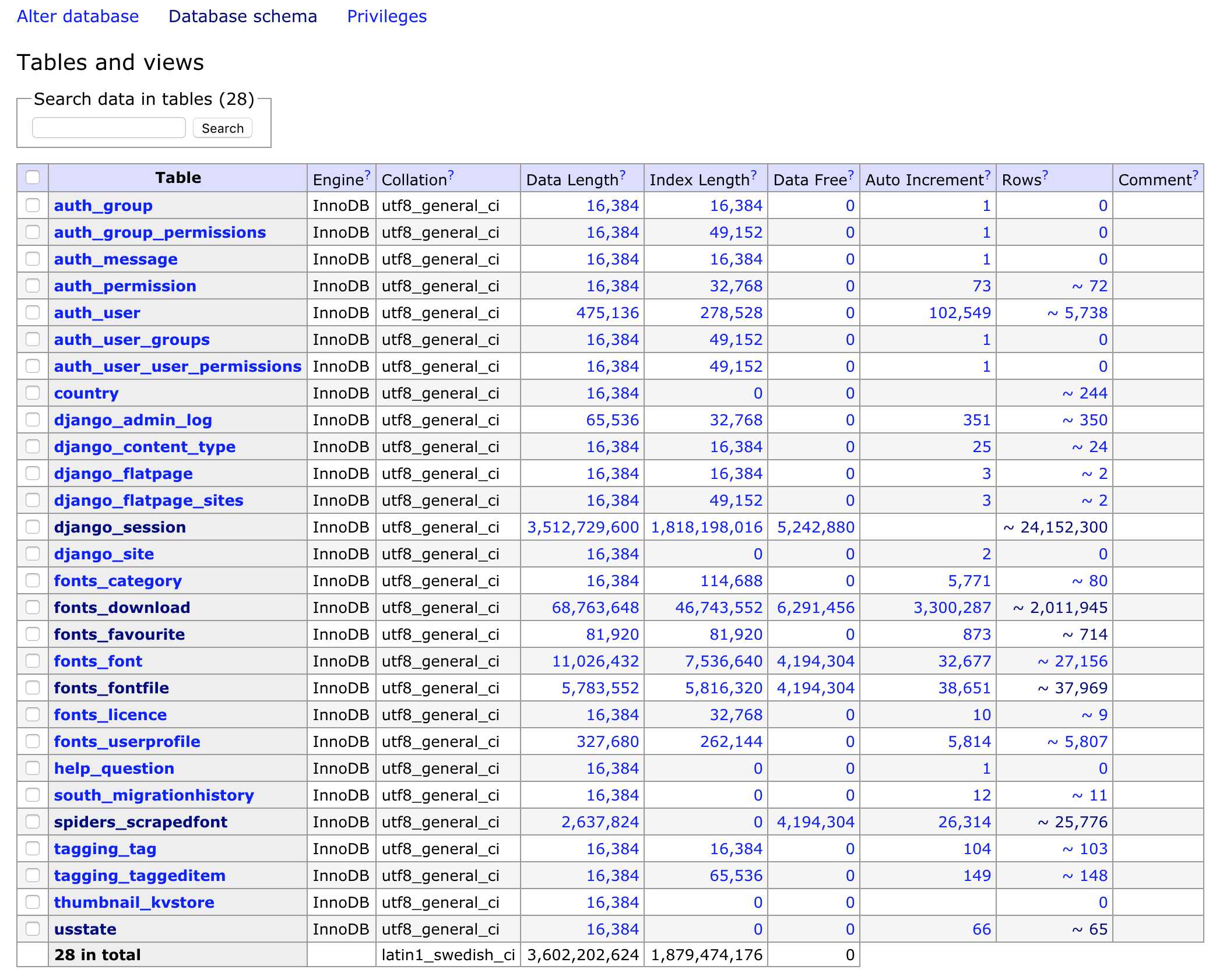
The django_session tables has 3,512,729,600 data Length and 24,152,301 rows
I am guessing this is where the issue is coming from and why the website just dies sometimes when mysql can not handle the query and several timeouts that kills the app. If it is something else then please enlighten me.
Anyways i tried deleting the django_session table but with no luck
I get the following errors
Error in query (1451): Cannot delete or update a parent row: a foreign key constraint fails (
font_database.fonts_fontfile, CONSTRAINTsession_id_refs_session_key_37e5d4124e1e319fFOREIGN KEY (session_id) REFERENCESdjango_session(session_key))
What do i do here? Need serious help here
MySQL version is 5.7.23
If you need any more information please ask me and i will try to add it to this question.
Thanks
UPDATE:
Just noticed that issue is with total number of connections on the MySQL server is maxed out at 152
mysql> show status where `variable_name` = 'Threads_connected';
+-------------------+-------+
| Variable_name     | Value |
+-------------------+-------+
| Threads_connected | 152   |
+-------------------+-------+
1 row in set (0.74 sec)
Also when i check the connections they are all from the django_sessions which is why when i restart server it works fine but then gets back to same issue as the sessions table is just too high and too many rows
mysql> show processlist;
+------+--------------------+-----------+--------------------+---------+------+--------------+----------------------------------------------------------------------------------------------------+
| Id   | User               | Host      | db                 | Command | Time | State        | Info                                                                                               |
+------+--------------------+-----------+--------------------+---------+------+--------------+----------------------------------------------------------------------------------------------------+
| 3709 | font_database | localhost | font_database | Query   | 3164 | Sending data | SELECT COUNT(*) FROM `django_session` WHERE `django_session`.`last_login` >= '2019-02-23 13:00:37' |
| 3710 | font_database | localhost | font_database | Query   | 3162 | Sending data | SELECT COUNT(*) FROM `django_session` WHERE `django_session`.`last_login` >= '2019-02-23 13:00:39' |
| 3711 | font_database | localhost | font_database | Query   | 3161 | Sending data | SELECT COUNT(*) FROM `django_session` WHERE `django_session`.`last_login` >= '2019-02-23 13:00:41' |
| 3714 | font_database | localhost | font_database | Query   | 3133 | Sending data | SELECT COUNT(*) FROM `django_session` WHERE `django_session`.`last_login` >= '2019-02-23 13:01:09' |
| 3716 | font_database | localhost | font_database | Query   | 3131 | Sending data | SELECT COUNT(*) FROM `django_session` WHERE `django_session`.`last_login` >= '2019-02-23 13:01:11' |
| 3717 | font_database | localhost | font_database | Query   | 3129 | Sending data | SELECT COUNT(*) FROM `django_session` WHERE `django_session`.`last_login` >= '2019-02-23 13:01:13' |
...
...
till maxed to 152 connections
Again if you need any additional information, ask and i will provide it. This is all i believe can help give idea of what issue is
社区高分解答
原帖链接 · Владислав Балаклейский · CC BY-SA 4.0
You have too many expired sessions for these 7 years. You may try
manage.py clearsessions
https://docs.djangoproject.com/en/2.2/topics/http/sessions/#clearing-the-session-store
Django does not provide automatic purging of expired sessions. Therefore, it’s your job to purge expired sessions on a regular basis. Django provides a clean-up management command for this purpose: clearsessions. It’s recommended to call this command on a regular basis, for example as a daily cron job.
摘自公开归档,保留原文语言,版式经整理,外部媒体与邮箱地址已移除。