

问题原文
原帖链接 · Ray Butterworth · CC BY-SA 4.0
Google Search Console is saying:
CLS issue: more than 0.25 (desktop)
First detected: 5/27/20
Status: Poor
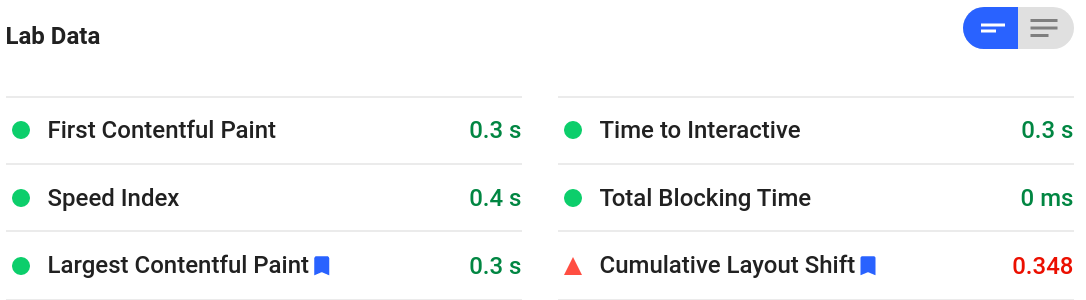
But the page itself is simply a table containing UTF-8 text. It has an external style sheet, but no images, scripts, or forms. The one possibly uncommon thing is that I serve it as XHTML.
Why would this page experience shift?
Strangely, the complaint occurs only for desktop, not for mobile, even though it is a wide table that can be read much better on a large screen.
(Note that I'm not especially concerned about performance, etc. itself; the page is mostly only for my own use. I'm simply curious about how and why layout shift could be detected.)
UPDATE: I've found a related problem, which I've posted as css - HTML vs. XHTML in timing of loading external style sheets - Webmasters Stack Exchange
已采纳解答
原帖链接 · DisgruntledGoat · CC BY-SA 4.0
A page containing a large table is likely to cause layout shift as the columns may change size as more content is loaded. (Browsers typically start showing content before the HTML has fully downloaded.) The effect is probably not visible on mobile because the later columns are off-screen to the right so any layout changes don't shift anything around.
However, in your particular case there is something else going on. In Firefox's dev tools you can see this message:
Layout was forced before the page was fully loaded. If stylesheets are not yet loaded this may cause a flash of unstyled content.
If you reload the page sometimes you can see that "flash of unstyled content" (in both Firefox and Chrome). I can't figure out exactly why that does occur though! This question from Stack Overflow gives many suggestions but I don't think any of then apply to your situation.
It's possibly due to having a separate style block there - perhaps try keeping everything to the one stylesheet, and maybe moving the stylesheet <link> element slightly higher up (underneath the charset tags). And perhaps you could set a width on the table columns (e.g. "33%") to prevent them changing.
摘自公开归档,保留原文语言,版式经整理,外部媒体与邮箱地址已移除。