

问题原文
原帖链接 · Samuel L · CC BY-SA 3.0
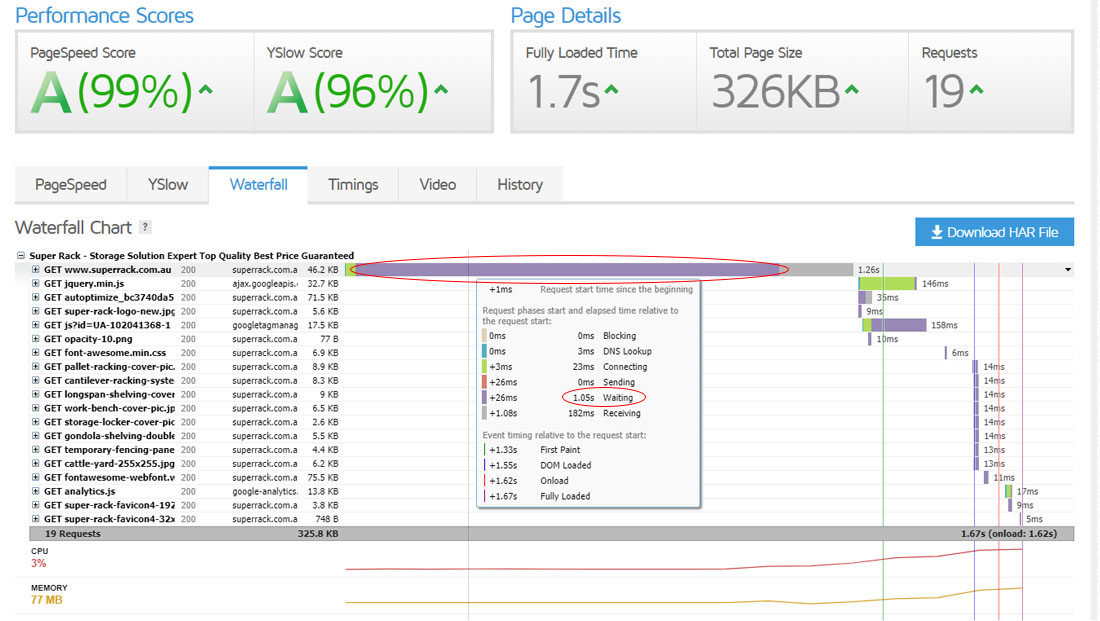
As the screenshot show, there is 1.05s waiting time on page load and I have done some tests to figure it out that this is caused by https.
I uploaded a plain html with just hello world and tested with both http and https, with http the wait time was just around 300ms while with https it was around 1s.
Does anyone know why and how to optimize that? I have researched a lot and confirmed that the server is running http/2, keep alive is on, and static contents caching is on.
Is there anything I can do to improve the wait time? Any advice would be appreciated.
已采纳解答
原帖链接 · Josh Salganik · CC BY-SA 3.0
Cloudflare by default does not cache HTML content. I suggest that you write a Page Rule to cache static HTML. Here we go:
- login to your cloudflare account
- using the dropdown in the top-left, select your domain name
- click the page rules app in the top of the menu (for added convenience and clarity, the icon below is exactly what you're looking for):

- Next, create a pattern & then apply a rule to that pattern. This requires you find a way to distinguish static vs. dybamic content by the URL. Some possibilities of accomplishing this are included below:
option a. to create a directory for static content, append a unique extension to static pages:
example.com/static/ [/static/ subdirectory for static HTML pages]
option b. appending a unique file extension to static pages:
example.com/.shtml [.shtml file extension to signify HTML that is static]
option c. adding a query parameter to mark the content as static:
example.com/?static=true [adding static=true query parameter]
The objective is to design the pattern to ONLY describe pages you know are static, of course.
- Click Cache everything in the Custom caching dropdown menu.
- Click Add Rule.
If at this point your HTML is not being cached, despite the cache everything rule, it means you need to override the origin cache directive with an "Edge Cache TTL" setting. Be sure that you set the edge cache TTL in Cloudflare even if the origin is sending the correct cache TTL headers - because again - Cloudflare will not cache HTML by default.
Hopefully this helps!
摘自公开归档,保留原文语言,版式经整理,外部媒体与邮箱地址已移除。