

问题原文
原帖链接 · msz · CC BY-SA 4.0
As the question title mentioned, I have checked my google console Crawl Report and found some of the URL have 404 which target the main/root directory. I have double-checked the assets and try to Index the URL, but the same issue is shown in the Crawl report, but this time the assets are available.
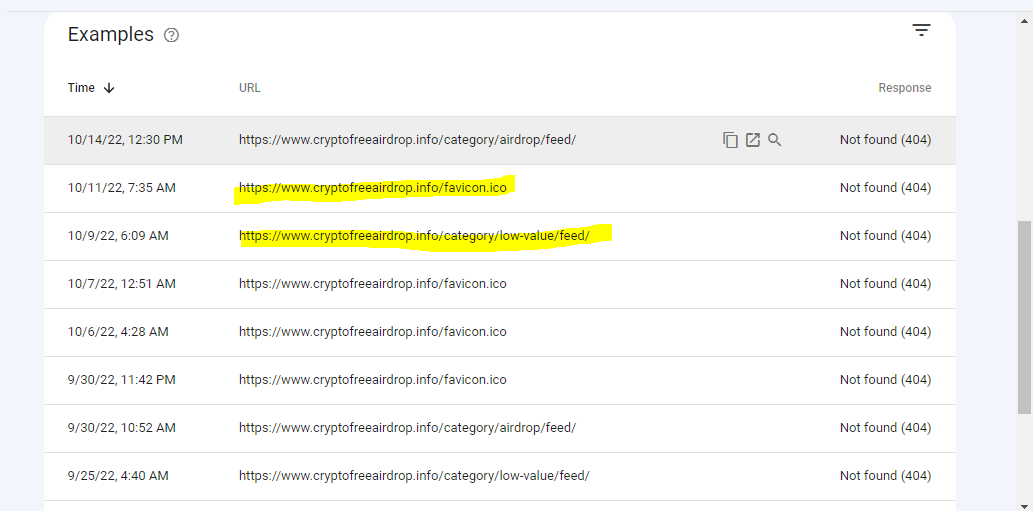
As you can see, the same URLs are repeated.
What I Tried:
I have tried to add the missing assets, so the error can be removed, but the link is still showing in the crawl report.
I try to index the link, but it is not indexing although it is Indexable as per google checking.
What I want:
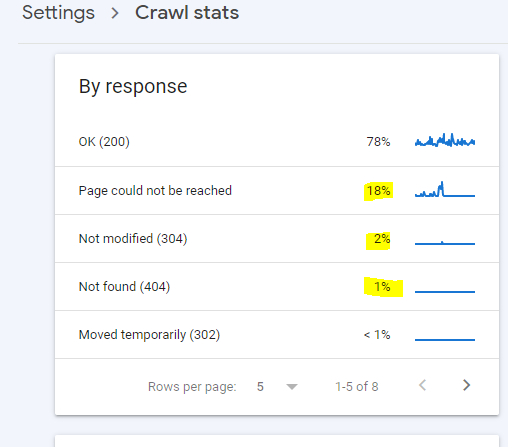
I am performing the Technical SEO on my site and I ended up on the Crawl issues, also are the Crawl issues can be fixed as there are many other issues showing which can be seen in the attached screenshot and what other improvements Do I have to do to increase the performance, etc?
已采纳解答
原帖链接 · Evgeniy · CC BY-SA 4.0
The crawl repost has nothing to do with performance. This report displays, which assets the Googlebot got, and what are the results of the crawling procedure.
There are only few variants, how Googlebot recognizes an asset:
- If an assets is a web document, Googlebot can get it through link anywhere im the web, on your site or in the sitemap,
- If an asset is something like your favicon, Googlebot can recognize it ONLY through a link!
This means, 404 errors on your site have the cause: anywhere on your site or outside of it Googlebot got links to your assets. Then it visited (crawled) them and got 404 as the status code.
If you are sure, you removed these assets from your site, consider to response requests with 410 status code. If Googlebot gets 410 it stops to crawl this asset fro ever. In case of 404 it comes from time to time again, in hope to find an assets alive.
If you are sure, your site doesn't have these assets, so just kepp calm, but don't try to follow recommendation of GSC and repair an error. There are some cases reported, where Googlebot tries to crawl not existing ressources, but after some tries stops it. If you try to set these errors as repaired, Googlebot will come again and again.
摘自公开归档,保留原文语言,版式经整理,外部媒体与邮箱地址已移除。